Customers often ask us this question: “What kind of manual testing process do you have?”. Over the years, we have built and refined a certain structure that helps us ensure that our testing teams do their best in making sure the product is of high quality.
Here’s what the process of manual testing looks like within a sprint.
Requirements analysis and planning
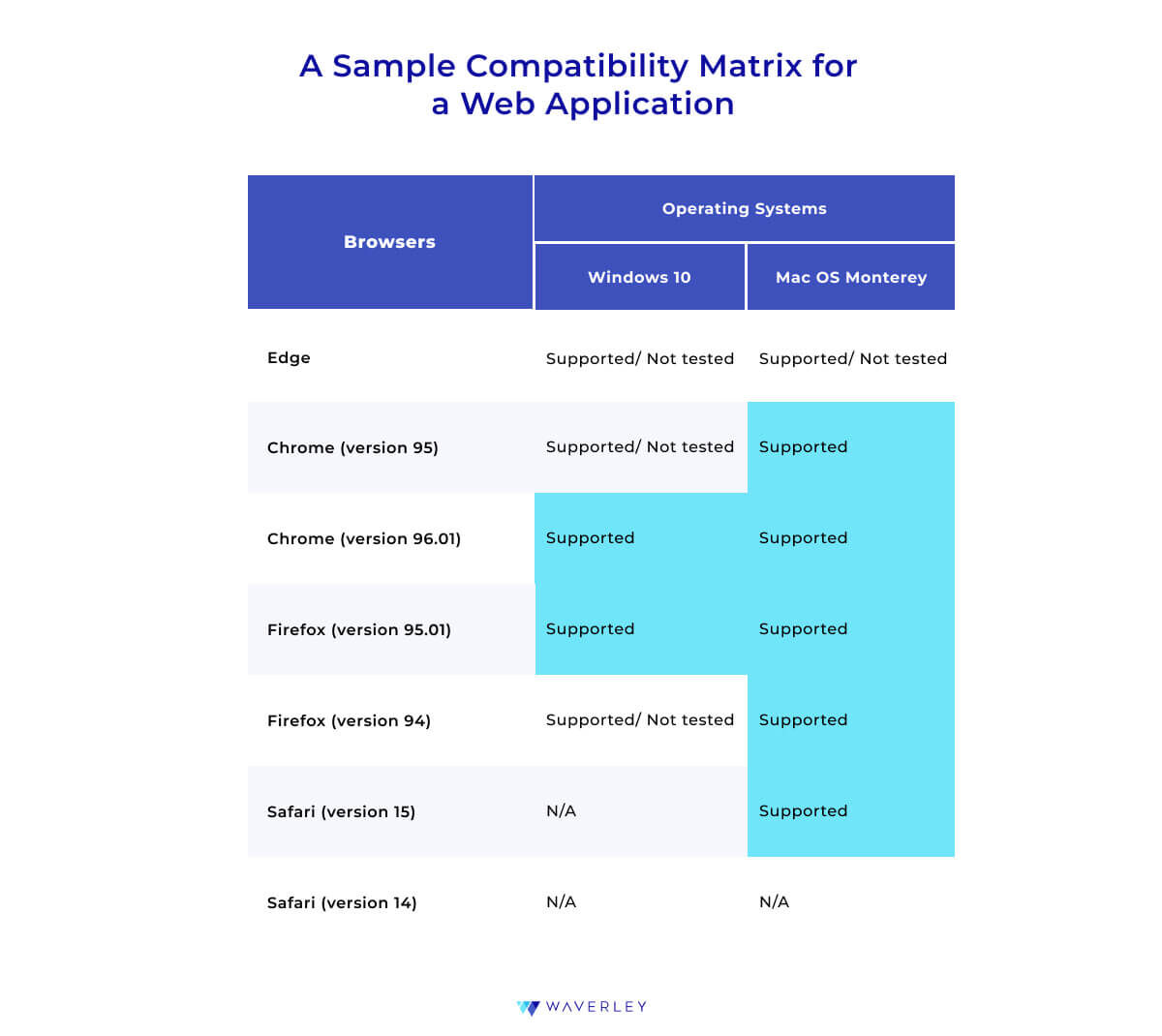
This part is one of the most important ones. Usually, planning should be done a couple of days before the start of a new Sprint. At this meeting, the team should determine the goal of the sprint, the scope of work(which can also be called the sprint backlog), and estimate tasks that need to be accomplished. Definitions of ready and acceptance criteria should also be defined. Also, don’t forget about compatibility testing. Each project has its own number of devices, operating systems, and browsers on which you need to check the efficiency of the system. The better we understand the requirements and the planned scope of work, the better chance we have to achieve a great, final result.
After the approval of the requirements and planning, we must proceed with the test design activities: writing test cases, and checklists.
Test case creation
As soon as the sprint starts, the Dev team starts working on the implementation of the new functionality and the Testing team starts creating test documentation.
Test documentation should be kept in one place and should be available to all team members.
Setting up a test management tool will help to better navigate all your testing docs.
Most often we use Zephyr, Xray, or Test Rail – which is also a very popular system.
With these systems, you can write and store documentation in one place and can create Test runs for each environment. Each time you run a separate Test run, for example, for regression tests, or for smoke testing, it will analyze the duration and, in the future, will tell you how much time it takes on average for each Test to run and when the release date is most likely.
Test Case Execution and Defect Logging
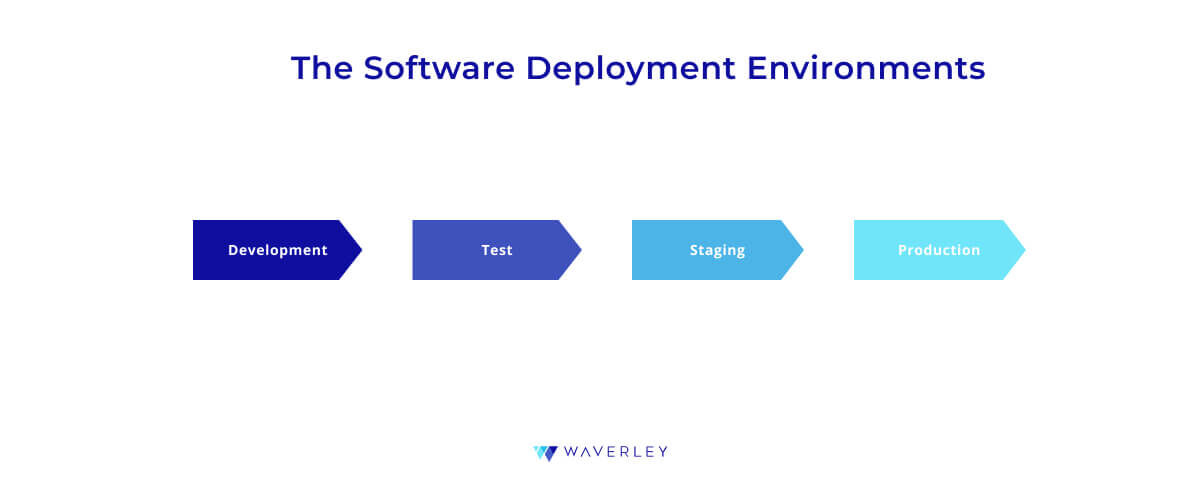
Gradually, the dev team gives ready-made tasks for testing. In turn, the QA team begins to perform functional testing using previously prepared test documentation. Test activities should be performed in a separate environment – a test environment.
During the passage of test cases or checklists, we have to mark each as Pass or Fail and create a bug report on each Failed.
A good bug report should consist of:
- ID/Bug number
- Bug Title/Summary
- Description
- Steps to reproduce
- Actual result
- Expected result
- Screenshot or Screen recording
- Platform/Environment
- Severity and Priority
- Assignee
Retesting and Regression
Each fixed bug should be double-checked. Toward the end of the sprint, it is important to set the date for the code freeze. As soon as we have a code freeze period, we do not allow any code changes. The QA team can perform regression testing in isolation. The Test team must verify that the application still works as expected after code changes, updates, or enhancements.
Regression testing is usually performed in a Test environment, but it also could be performed in a Stage environment. Also, at this phase, the Component, Integration, and System testing should be completed.
Release and Test Report Sharing
The release is the final stage of a sprint that reflects the efforts of all team members. At this stage, a code from the staging environment deploys to the production environment where it would be used by the end-users and customers. That is why it is very important to conduct the release very carefully without any risks of damaging or losing the existing production data and make sure there are no blockers in the workflows. To avoid such risks, smoke testing of the production environment should be performed right after the production update to make sure that all critical functionalities are working as expected.
Based on our experience, it’s also important to use other best practices during the release:
- Try to avoid last-minute changes to release scope when regression or smoke testing is in progress. It is very important to consider a “code-freeze” approach with a development team and stakeholders.
- Do not conduct releases on Fridays, since there is still a possibility of issues appearing in the production environment that could affect some users. Allow for the development team to be able to address such issues as soon as possible.
- It’s important to consider the QA team’s feedback that can be collected after the regression testing is done on the quality of the planned-for-release scope when scheduling the release date. If the regression testing is not yet finished, it would be risky to conduct the release.
- Do not conduct releases while the application is in use by the end-users. The deployment process could be very time-consuming, which could cause some downtime in the application availability. For real-time applications, it could be crucial. That is why it’s important to know the time frames when the minimum amount of user activity in the application occurs, and conduct releases in these time frames.
- All team members should be available and focused during the release to be able to quickly fix any issues that may happen. At this stage, good and effective communication between QA Engineers, developers, and stakeholders is very important.
It would be useful to provide a test report after the smoke testing. Increasingly, customers are asking for such reports. Test report templates are different depending on the project and customer requirements. But what is important is to give information about the condition of the product in terms of quality. What features we have implemented, what was tested, and what was successfully released. Do we have any blockers? Perhaps we planned to release some functionality, but, for some reason, moved the implementation to future sprints? It all should be indicated in the report.
Support and Maintenance
After the release, the end-users start using the application and it’s possible that some issues could be identified by them. This could happen because of a variety of different environments (e.g. browsers versions, mobile devices, etc.) that could be used by real users and sometimes because of different approaches to using the application.
At this stage, it’s very important to track the issues/improvements from the end-users and customers to keep improving the application from a functional and usability point of view.
Usually, for each issue/improvement, the testing or support team creates new tickets in the bug-tracking system. Right after that, a QA team tries to reproduce the issue mentioned in the ticket and defines its severity, so that the development team and the customer can keep it in mind when planning future releases or hotfixes if there are critical or blocking issues.