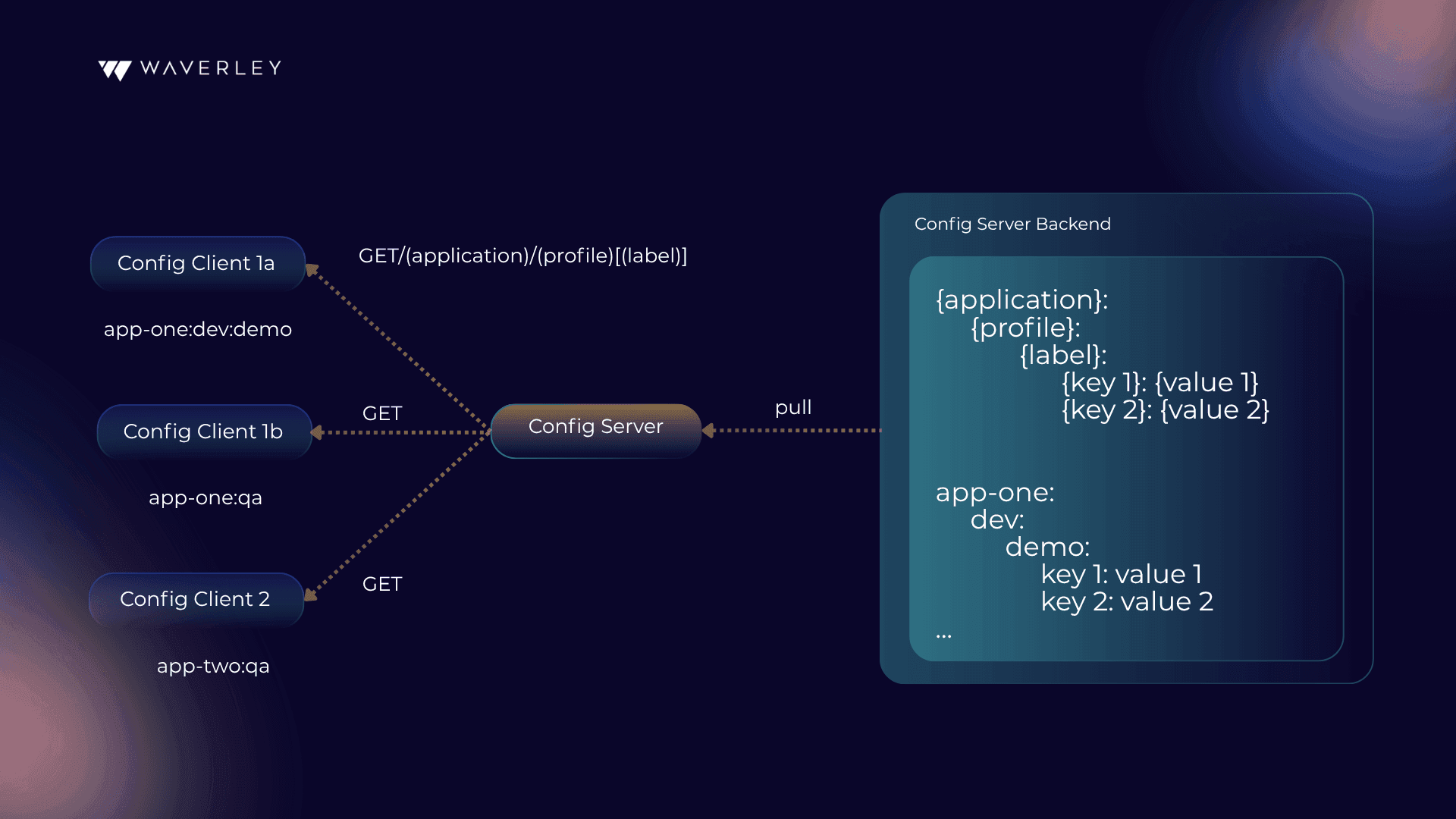
Config Client fetches data based on a composite key of three values: application, profile, and optional label. Later, we will see what purpose each of them serves. For now, it is enough to mention that the first one allows grouping properties per client application type, profiles serve the same purpose as in traditional property-based configuration, and labels can be used for versioning.
Spring Cloud Config feature is enabled in Spring Boot by adding a few dependencies to classpath and writing a few lines of initial configuration.
Config Client
To make your Spring Boot application act as Config Client, you simply need to add the spring-cloud-starter-config dependency and specify the following set of configuration properties:
spring.cloud.config.name=demo-app # {application}
spring.cloud.config.profile=demo-profile # {profile}
spring.cloud.config.label=demo-label # {label}
spring.config.import=optional:configserver:To specify application and profile, you could also use Spring Boot native properties spring.application.nameand spring.profiles.active, while the cloud-specific ones have higher priority if both are present. There is no native alternative for a cloud-specific label property. Even though all three properties are optional, application and profile will still have default values assigned on the client side (which are “application” and “default” correspondingly). Only a missing label won’t be requested from the client side and it is up to the config server to choose a default value (which is backend-specific and can be “master”, “trunk”, etc.)
In the above example of Spring Boot configuration properties, the config server URI is omitted and the default value of “http://localhost:8888” is used. You can explicitly specify your URI or even a list of URIs separated with commas. Also, it is marked as optional in the example, which means we let our client Spring Boot application start even if the config server is not available.
Config Server
To make your Spring Boot application a Config Client, you need to add the spring-cloud-config-serverdependency, put the @EnableConfigServer annotation, and specify a set of backend-specific properties. Here is an example for Git backend:
server.port=8888
spring.profiles.active=git
spring.cloud.config.server.git.uri=https://example.com/path/to/your/repo.gitPort 8888 is the default value used by config clients and if you choose a different one here in Spring Boot, you need to adjust the client settings accordingly. Active profile tells us which type of backend to use. Just for visibility, the example explicitly mentions git, which could be omitted as the default value for the backend type. Next, you specify the backend-specific properties following the format: spring.cloud.config.server.{backend}.*. In this particular example, there is a single URI property. The easiest way to see the full list of properties supported by the backend of interest when using Spring Boot is to search for the corresponding implementation of the EnvironmentRepositoryProperties interface in the java source code. There, you’ll find default values used by the backend as well. You might need additional classpath dependencies like the JDBC driver based on a specific selected backend.
Config Server is designed to be a generic solution serving clients written in different technologies, not only in Java. That’s why it exposes a variety of endpoints that support several data formats. The one used by Config Client is /{application}/{profile}[/{label}]. It returns a JSON structure tied to Java classes from the Spring Cloud Config library. The structure itself is not so important here because the whole communication layer is fully encapsulated inside the library. The endpoint’s path embodies a composite key of three values that were mentioned before. The Spring Boot Config Server uses a composite key to build search criteria suitable for the underlying Backend. It could be a file path in the case of Git repository or SQL query parameters if a JDBC-compatible backend is used. Here is the full list of currently supported backends: Version Control (Git, SVN), File System, AWS S3, JDBC, Redis, HashiCorp Vault, CredHub, Composite, Custom. In our case, “Composite” means that you can fetch and aggregate data from different backends at a time and “custom” means that you can provide your own implementation. You can find more details about each Backend <here: https://docs.spring.io/spring-cloud-config/docs/current/reference/html/>.
Just for visibility, let’s see how input application, profile, and label are treated by Git and JDBC Backends. These two completely different data storages will give you an idea of how others work.
Git Backend:
Git Backend persists data in property files, where target file names are searched based on the requested application and profile.
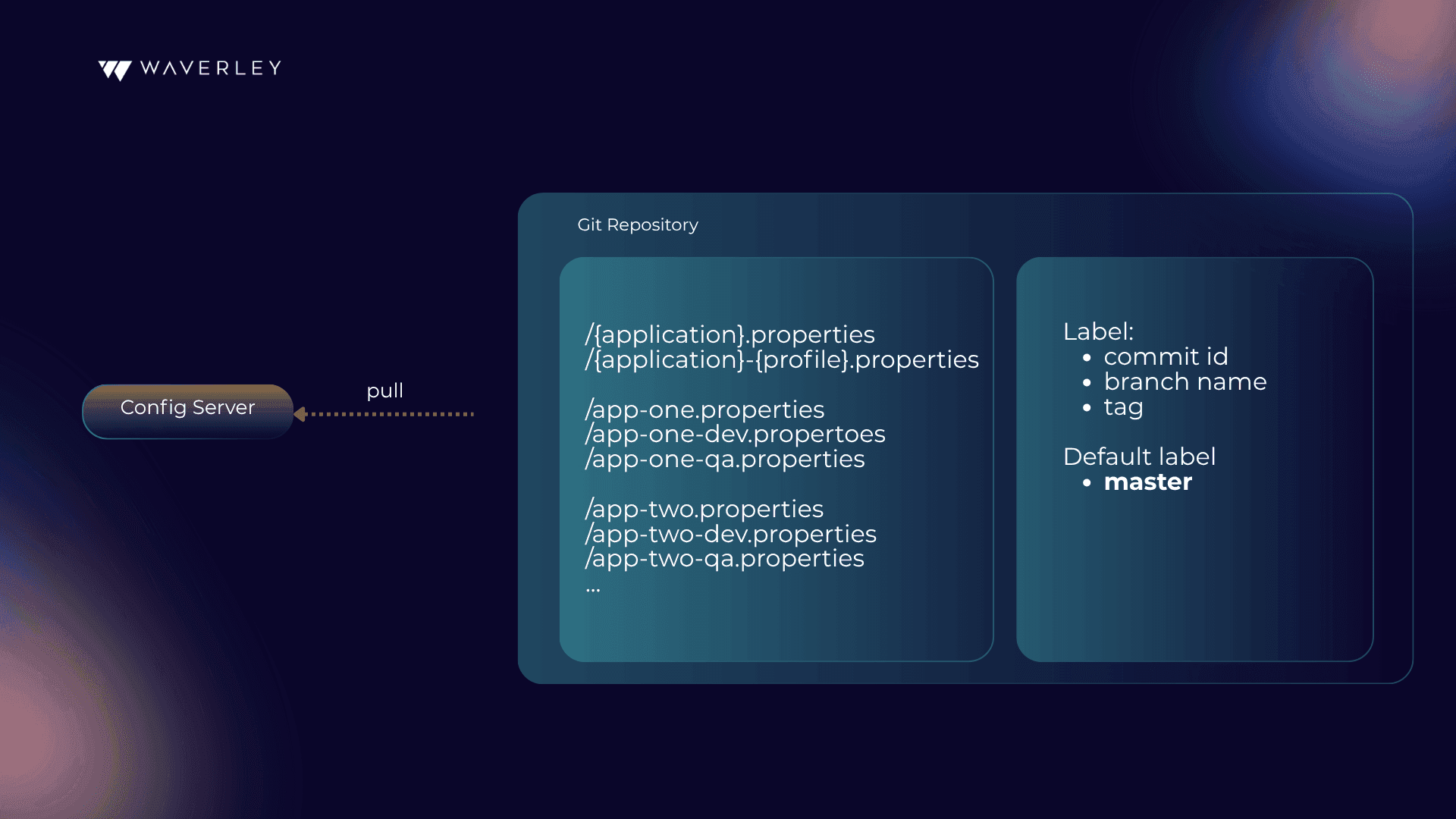
The Backend merges properties from the default file, without suffix, and a profile-specific one, giving the latter higher priority. The requested label is used to identify the desired version of the file and can be either commit id, branch name, or tag. If no label is specified by the client, then “master” is used by default in Spring Boot.
JDBC Backend:
The JDBC Backend implies any JDBC-compatible database.
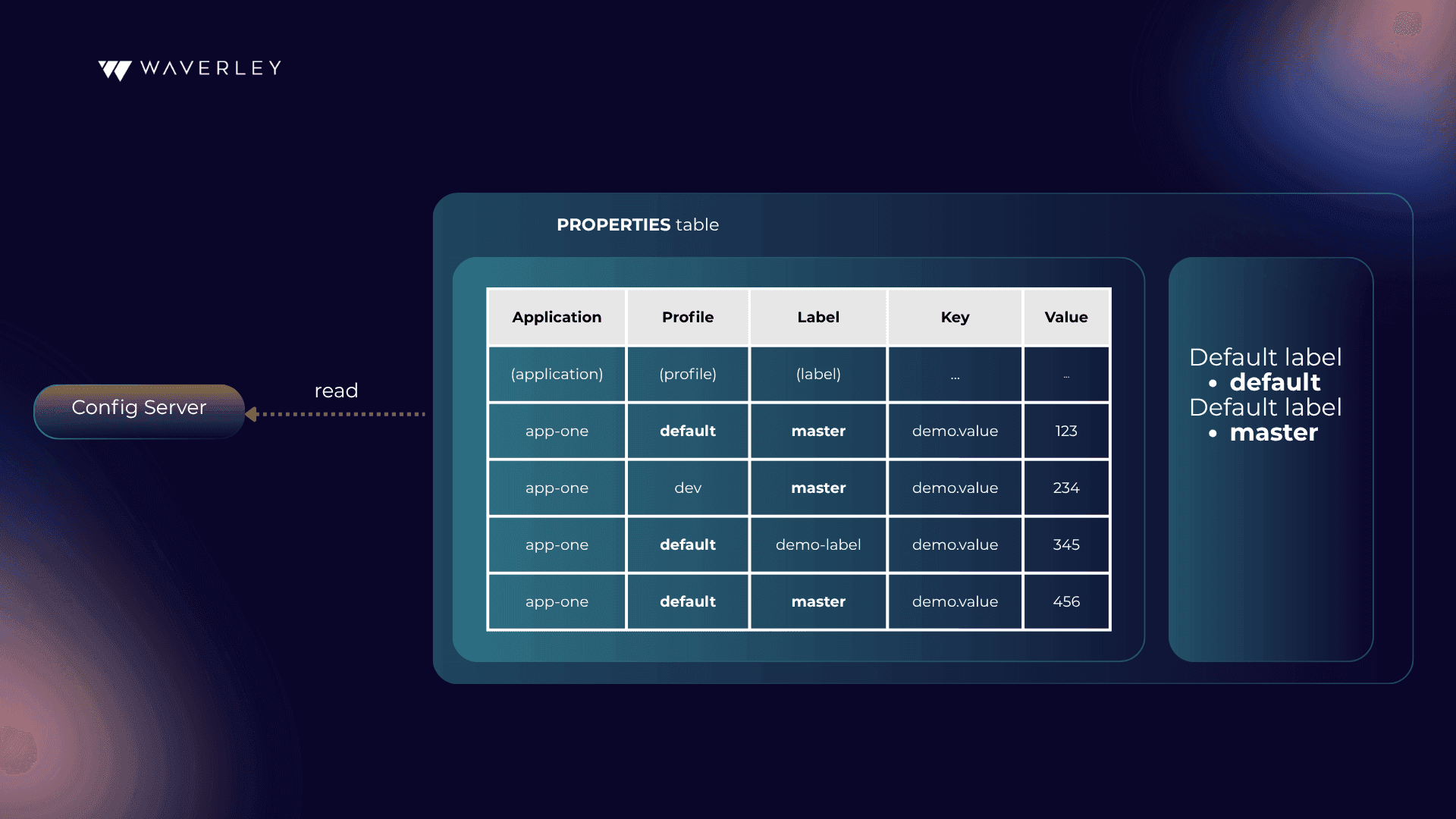
By default, it stores data in a PROPERTIES table with five columns. APPLICATION, PROFILE and LABEL columns match the composite key requested. KEY and VALUE constitute the values to be returned. If no label is specified by the client, then “master” is used by default. Backend merges the records matching the PROFILE = “default” description and the profile-specific ones, giving the latter higher priority.
Custom Backend:
Official Spring Boot documentation is not too verbose about the Custom Backend implementation details and, moreover, I find it a little bit misleading. Namely, it says that you need to provide your own EnvironmentRepository bean to be included as a part of a composite environment. It does not mention any other classes to be implemented or how exactly to link the composite environment to the Java code. That is why I would like to tell you a little bit more about what happens under the hood with Spring Boot and what classes actually need to be implemented. Here is how a custom repository is normally configured:
spring.profiles.active=composite
spring.cloud.config.server.composite[0].type=demoHere, “composite” is a predefined word and “demo” is the name of your custom repository. What Spring Boot does in this case is loops through beans of the EnvironmentRepositoryFactory type (not EnvironmentRepository!) and searches for a bean whose name starts with “demo”. Then the found factory is used to instantiate the EnvironmentRepository. In other words, you don’t need to explicitly define a bean of the EnvironmentRepository type. Moving further, EnvironmentRepositoryFactory is parameterized with the EnvironmentRepositoryProperties interface and you will have to implement it unless you are lucky to find an existing class with identical config options, which is very unlikely. To summarize, with Spring Boot, in total you will have to implement three interfaces and define a bean of the EnvironmentRepositoryFactory type:
public class DemoRepository implements EnvironmentRepository {
@Override public Environment findOne(String application, String profile, String label) {...}
}
public class DemoProperties implements EnvironmentRepositoryProperties {
@Override public void setOrder(int order) {...}
}
public class DemoRepositoryFactory implements EnvironmentRepositoryFactory<...> {
@Override public DemoRepository build(DemoProperties properties) {...}
}
@Bean
public DemoRepositoryFactory customRepositoryFactory() {
return new DemoRepositoryFactory();
}One more point to mention about Spring Boot is that if the config client requests multiple profiles at a time, they will be passed to your EnvironmentRepository as a single comma-delimited string and it’s up to the custom implementation to parse the input value and build an aggregated result accordingly.
Relaxed binding
The last thing I would like to mention before we jump to aspects of Spring Boot configuration management is Relaxed Binding. We have discussed many ways to specify configuration properties when we use Spring Boot and it may happen that a property name that works fine with one source becomes eligible for another due to some special characters included. For example, your operating systems may not allow the dash “-” to be part of an environment variable name. To solve such problems, Spring Boot applies so-called Relaxed Binding: it supports replacements for certain characters when matching property names. For example, all three properties
demo-value=abc
DEMO_VALUE=abc
demoValue=abccan be equally mapped to:
@Value("${demo-value}")
String demoValue;
@ConfigurationProperties
public class Demo {
String demoValue;
// getters and setters
}However, when dealing with @Value annotation in Spring Boot, not all Relaxed Binding rules are bidirectional. For example, it won’t work if you define your property as demo-value=abc and try to access it with @Value("${DEMO_VALUE}"). This is because Relaxed Binding is aimed to solve real scenarios you may face in practice, and supporting unnecessary combinations would increase ambiguity. In general, they recommend using a kebab case variant (with dashes) whenever possible. Also, this is an additional reason to use @ConfigurationProperties instead of @Value because the former has fewer problems with data binding in Spring Boot. The main points I would like to emphasize here are:
- If you decide to switch from one property source to another and face issues with special characters, don’t hurry to either give up the idea or change mapping in Java code. Simply check how Spring Boot allows character escaping.
- Follow the recommendations for data mapping. It will allow you to benefit from Relaxed Binding and make you more flexible in switching property sources in the future.